Critical Question: If up to 40–50% of your website visitors are currently invisible to your tracking
stack — what does that mean for every optimization decision, every budget allocation, and every ROAS report
you’ve presented to a client in the last two years?
Table of Contents
- The Tracking Crisis: What You’re Actually Losing
- Why Client-Side Tracking is Broken in 2026
- Server-Side Tracking: Architecture & Implementation
- Meta Conversions API (CAPI): The Full Picture
- Google Ads Enhanced Conversions
- First-Party Data Infrastructure
- Attribution Models: From Last-Click to Incrementality
- Practical Implementation Roadmap
- Field Notes from Agency Work
The Tracking Crisis: What You’re Actually Losing
Let me start with a number that should stop you mid-scroll. Right now, before you implement a single
line of server-side code, your analytics are likely undercounting your actual audience by a significant
margin — and your ad platforms are optimizing against an incomplete, distorted signal.
Here’s what’s actually happening to your tracking stack in 2026. Safari’s Intelligent Tracking
Prevention (ITP) has blocked all third-party cookies by default for years — and caps first-party
cookies set via JavaScript at just 7 days. Firefox’s Enhanced Tracking Protection does the same.
Chrome, which stopped short of full deprecation, now offers users a choice — and opt-out rates are
climbing. Combined, Safari and Firefox alone account for roughly 25% of browser market share.
Then there’s iOS ATT (App Tracking Transparency). With most iOS users having opted out, Meta Pixel
tracking on mobile Safari is, for all practical purposes, dead. Every Facebook Ads campaign targeting
iPhone users is running blind on the browser side. Every reported conversion in Meta Ads Manager
is an undercount.
Why Client-Side Tracking is Fundamentally Broken in 2026
Client-side tracking works by loading JavaScript tags (pixels, SDKs, GTM containers) directly in the
user’s browser. It was elegant for the early web. In 2026, it’s a leaky bucket. Here’s the anatomy
of the failure:
scripts before they load. 25–40% of your traffic (higher among tech-savvy audiences) generates zero pixel data.
on iPhone Safari, browsed your site, then came back 8 days later to purchase? That conversion
is completely unattributed. Your Facebook campaign gets zero credit.
mobile Safari is effectively dead. Your reported Meta ROAS for campaigns targeting iPhone users
is a significant undercount.
compliant consent management platform (CMP), you’re exposed. GDPR fines have reached €5.88 billion
cumulatively. This isn’t theoretical risk.
The compounding effect: When Meta’s algorithm can only see 60–70% of your actual conversions,
it’s training its delivery model on an incomplete signal. It makes worse decisions about who to show
your ads to, when, and at what bid. You’re not just measuring badly — you’re optimizing badly.
Every dollar of CPC budget is less efficient than it should be.
Server-Side Tracking: Architecture & Why It Works
The core insight behind server-side tracking is simple but powerful: instead of asking the
user’s browser to send data to Meta or Google — where it can be blocked, stripped, or
throttled — you capture the event on your own server first, then relay it to the ad platforms
from your infrastructure.
Browsers can block JavaScript from loading. They cannot block your server from making an
HTTPS request to Meta’s API endpoint. That asymmetry is the entire architecture.
✅ Ad blockers cannot intercept server-to-server calls ·
✅ Cookie lifetime extends to 90–400 days ·
✅ Ad blocker bypass rate approaches 95%
What Actually Happens When You Migrate
The data from real server-side migrations is compelling. According to 2026 industry figures,
over 72% of B2B companies have now implemented server-side tracking, reporting an average 45%
improvement in data quality over client-side-only approaches. In terms of raw conversion
reporting, teams consistently see 20–40% more reported conversions after migration — not because
they’re gaining new customers, but because they’re finally seeing the ones they already had.
The “Dark Matter” of Conversions: Those 20–40% additional reported conversions
are not new — they always existed. Your server-side implementation is recovering conversion data
that was always happening but was invisible to your pixel. If you were reporting 100 conversions/week,
the real number was likely 120–140. Every budget and bid optimization was based on the wrong baseline.
Cookie lifetime extension is another underrated benefit. Under Safari’s ITP, JavaScript-set cookies
expire in 7 days. Server-side first-party cookies are exempt from this restriction and can persist
for 90–400 days. For any business with a sales cycle longer than a week — virtually all B2B,
high-consideration retail, and service businesses — this is transformative for attribution accuracy.
Meta Conversions API (CAPI): The Full Technical Picture
Meta’s Conversions API (CAPI) is the server-side counterpart to the browser-based Facebook Pixel.
While the Pixel fires a JavaScript event from the user’s browser, CAPI sends a
server-to-server HTTP POST request directly from your infrastructure to Meta’s Graph API endpoint.
Browser blockers cannot intercept it. iOS ATT restrictions do not apply.
CAPI adoption currently sits at roughly 50–60% of Meta advertisers — but that number is
growing fast, and any agency not implementing it is delivering substandard results. By 2027,
CAPI will be table stakes for any serious media buyer.
Three Implementation Approaches
Run a Google Tag Manager server container on Google Cloud Run, AWS, or a dedicated VPS.
Your web GTM container sends events to the server container instead of (or in addition to)
directly to Meta. The server container then forwards to Meta CAPI, GA4 Measurement Protocol,
and Google Ads API simultaneously — single processing point, multiple destinations.
When a conversion event fires (checkout, form submit, subscription), your server-side code
formats the payload and POSTs it directly to Meta’s Conversions API endpoint. You control
every parameter, handle deduplication logic yourself, and aren’t dependent on third-party
infrastructure. Requires developer resources but offers the most robust implementation.
Third-party services that provide the server infrastructure and handle API connections
with pre-built integrations for Shopify, WooCommerce, and other platforms. Trade-off:
less customization, faster time-to-implementation, monthly SaaS cost.
The Three KPIs That Define CAPI Success
Practitioner Note from Agency Work: Meta recommends running both Pixel + CAPI simultaneously
(dual-layer tracking). The Pixel captures upstream signals — page views, add-to-cart — that pure
server-side misses. CAPI captures the definitive conversion signals. Together, they feed Meta’s
algorithm the most complete picture possible. Never run CAPI-only if you can avoid it.
Google Ads Enhanced Conversions: The Often-Missed Upgrade
While most advertisers are aware of Meta CAPI, Google Ads Enhanced Conversions (EC) is frequently
overlooked — yet it solves the same fundamental problem for Google campaigns.
EC supplements your standard Google tag by sending hashed first-party data (email, phone number,
physical address) to Google, enabling better conversion matching even when cookies are absent.
- Relies on Google click ID (gclid) cookie
- Fails when user changes browser or device
- 7-day Safari cookie expiry breaks attribution
- Missing for ad-block and consent-denied users
- Smart Bidding trains on incomplete signal
- Hashed PII sent directly to Google via HTTPS
- Cross-device matching via Google account login
- Recovers conversions from ITP & cookie loss
- Improves Smart Bidding signal quality
- Compatible with GA4 Consent Mode v2
The implementation path for Google Enhanced Conversions is through either Google Tag Manager
(preferred for most setups) or direct gtag.js configuration. You capture first-party customer
data at conversion points (thank-you pages, form completions), hash it using SHA-256 before
transmission, and send it alongside the standard conversion event.
Critically, Enhanced Conversions for Leads extends this to offline B2B scenarios: you can import
closed-won CRM data back into Google Ads, connecting lead form submissions to actual revenue.
For B2B advertisers running Google Search campaigns, this transforms how Smart Bidding
optimizes — instead of optimizing for “someone submitted a form,” it learns to optimize for
“someone submitted a form who became a paying customer.”
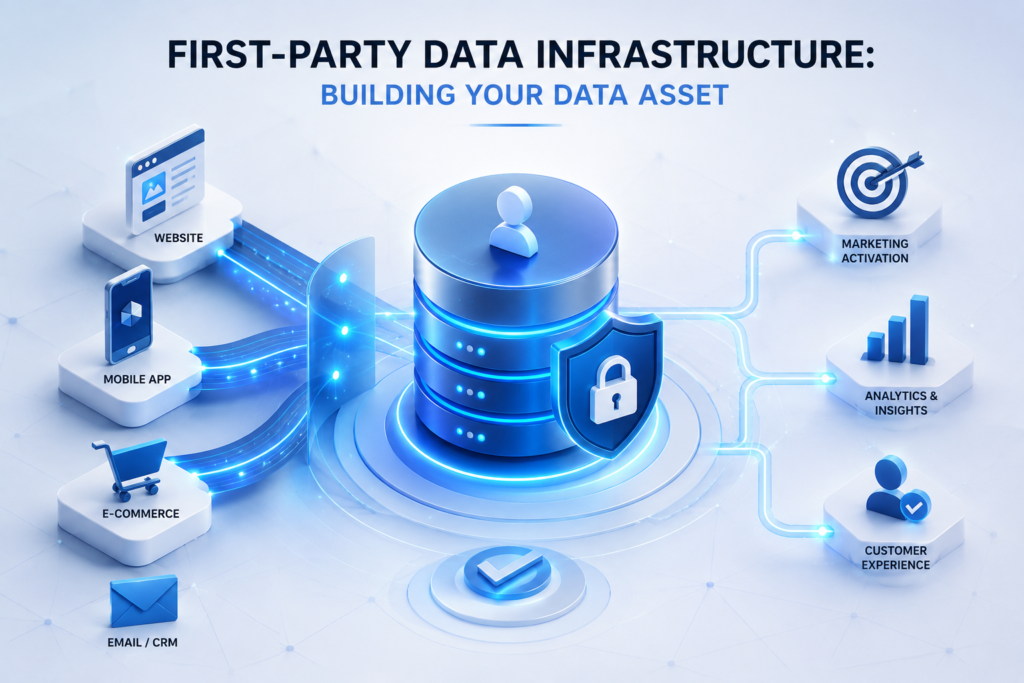
First-Party Data Infrastructure: Building Your Data Asset
Server-side APIs solve the transmission problem. First-party data solves the
identity problem. To fully leverage CAPI and Enhanced Conversions, you need a robust
first-party data foundation — a structured way to collect, store, and activate customer data
you own directly, regardless of cookie availability.
Companies using first-party data strategies achieve significantly better customer retention and marketing ROI compared to those relying on third-party data. The competitive moat is widening every year.
Strategic note: First-party data collection is not just an analytics play — it’s a
competitive moat. As third-party signal degrades for everyone, the businesses with rich
CRM-integrated, consent-based first-party data will run materially more efficient ad campaigns
than competitors still relying on pixel-only tracking. The gap in cost-per-acquisition between
first-party and third-party-dependent advertisers will widen every year.
Attribution Models: From Last-Click to Incrementality Testing
Fixing your data collection infrastructure is only half the battle. The other half is
choosing the right measurement framework to evaluate what that data actually means.
In 2026, the marketing measurement hierarchy has shifted dramatically.
Why Incrementality Testing is the 2026 Gold Standard
Traditional attribution models measure correlation: this ad was shown before this purchase,
therefore it caused it. Incrementality testing measures causality: would this purchase
have happened anyway, without the ad?
The distinction has massive financial implications. According to a 2025 Marketing Science
Institute study, brands operating without incrementality testing waste an average of 23% of
marketing spend on non-incremental activities — campaigns that generated conversions that would
have happened regardless. These are sales you were claiming credit for but not causing.
Attribution models overestimate channel contribution by 20–40% on average, according to
Gartner’s 2025 State of Marketing Analytics. Meanwhile, 73% of marketing leaders now view
incrementality testing as essential — up from just 41% in 2023. The industry has moved.
Practical Incrementality Methods
Practical Implementation Roadmap: 30-Day Migration Plan
The architecture above can feel overwhelming, but the migration follows a clear sequence.
Here’s how I approach it when onboarding a new client — from diagnosis to full deployment.
- Run GA4 vs. Meta Ads Manager vs. CRM conversion count comparison — identify the discrepancy
- Install Tag Assistant + Events Manager pixel diagnostic — count blocked event rate
- Audit current GTM setup: identify all tags, triggers, custom HTML
- Check Safari/Firefox traffic percentage in GA4 audience report
- Document current CMP setup and consent rates by geo
- Provision GTM server-side container on Google Cloud Run (minimum 3 instances for redundancy)
- Configure custom domain for server container (e.g., analytics.yourdomain.com) — critical for first-party cookie writing
- Set up GA4 client and GA4 tag in server container
- Validate server container receives events from web container
- Set up Meta CAPI tag in server container — configure all standard events (PageView, AddToCart, Purchase, Lead)
- Implement event_id deduplication logic to prevent double-counting with browser Pixel
- Configure customer data parameters (email, phone — SHA-256 hashed) for EMQ score optimization
- Enable Google Enhanced Conversions — configure hashed PII transmission
- Test in Meta Events Manager: verify Pixel vs. Server event counts and deduplication
- Run 7-day parallel comparison: Pixel-only vs. CAPI-supplemented conversion counts
- Confirm EMQ score ≥ 6.0 in Events Manager — troubleshoot if below threshold
- Update all reporting dashboards with new baseline conversion volumes
- Brief client on why reported conversions increased — important expectation management
- Schedule first incrementality/conversion lift study for Month 2
Field Notes: What I’ve Learned Running This in Practice
Theory is one thing. Here’s what actually happens when you implement this stack for real
clients — the surprises, the friction, and the moments that change how you think about
digital advertising measurement.
When you first deploy CAPI alongside an existing pixel-only setup, reported conversions in
Meta typically jump 20–40%. Clients who don’t understand what happened will think the
system is broken — or worse, that you’ve somehow inflated the numbers. I now make it
standard practice to brief clients before deployment: “Our reported conversions are going
to increase next week. This doesn’t mean we’re generating more sales — it means we’re
now seeing conversions that were always happening but invisible.”
The most common CAPI implementation failure I’ve encountered is double-counting: a
Purchase event fires once from the browser Pixel and once from the CAPI, without proper
deduplication. Meta then “sees” twice as many purchases, trains its algorithm against
this inflated signal, and your delivery quality degrades. Always implement event_id
deduplication — a unique identifier per event instance shared between your browser and
server payloads. Then verify in Events Manager that duplicate rates stay below 5%.
Running a conversion lift study on a retargeting campaign that “looked great” in the
attribution dashboard is sometimes humbling. Retargeting frequently shows low true incrementality
— the users it converts were often going to buy anyway. I’ve had campaigns showing
5× reported ROAS that turned out to have incremental ROAS of under 1.5× when tested
properly. This isn’t an argument against retargeting — it’s an argument for testing it
and right-sizing its budget allocation against prospecting.
In EU/EEA markets, deploying Google’s Consent Mode v2 is not optional — it’s required for
accurate audience and conversion signals. But many businesses implement it lazily, with dark
patterns that depress consent rates. Every 10% drop in consent rate in a GDPR market
effectively taxes your data quality by 10%. If you’re targeting European audiences, invest
in a proper CMP (Cookiebot, OneTrust) and run A/B tests on your consent banner UI to
maximize opt-in rates. A 20% improvement in consent rate directly translates to 20%
better conversion data quality.
The 5 Actions That Matter Most in 2026
Digital marketing practitioner and agency CEO specializing in performance advertising,
data infrastructure, and media buying. Founder of NEWSTAR Digital (newstarvn.com) and
publisher at quangcaotructuyen24h.vn, marketing.danang.vn, and mrhuynh.com.
Writes about the intersection of technical ad operations and real-world ROI.
- Secure Privacy / Humblytics — Server-side tracking adoption statistics (2026): 72% B2B adoption, 45% data quality improvement
- 1ClickReport — Browser market share and tracking vulnerability analysis (2025): 40–50% hard-to-track users
- Ingest Labs — Server-side conversion recovery analysis (2026): 20–40% recovered conversion volume
- Marketing Science Institute — Incrementality waste study (2025): 23% average non-incremental spend
- Gartner State of Marketing Analytics (2025): 73% of leaders view incrementality testing as essential
- DOJO AI / Meta for Business — CAPI adoption analysis (2026): 50–60% current adoption, 80%+ projected by 2027
- EMARKETER / TransUnion — Incrementality survey (July 2025): 52% of US marketers using incrementality testing
- Google — Conversion Lift minimum budget reduction: $100K → $5K (2025)